
Low-Code and No-Code Application Development: A Simple Explanation

We are living in an era where software applications are everywhere! Be it handling employees or handling consumer data. Businesses are implementing digital tools to ease their processes. Developing software requires skilled developers who can write heavy code! It’s a myth now… The process is slow and costly.
There will be a question in your mind: Why is it a myth? Low-code and no-code application development has changed the process of software development. These platforms have made it possible to develop applications in a quick manner with fewer technical skills.
This blog explains:
- What does low-code and no-code development mean
- How it works
- Where it is used
- Why businesses prefer it
What Is Low-Code/No-Code Application Development?
The big question! Right? Low-code/no-code (LCNC) development is a process of developing applications by making use of visual tools in place of writing long code. Users create apps by dragging elements and connecting workflows.
These platforms completely remove the need for traditional coding and make development more accessible.
In simple terms:
- Low-code signifies that some coding is required.
- No-code signifies no coding is needed
Both methods concentrate on speed and ease of use.
Why Low-Code and No-Code Became Popular
Businesses had limited options earlier. They either bought ready-made software or waited months for custom development. Both options had drawbacks.
Low-code and no-code platforms solve these problems by allowing businesses to:
- Build custom apps quickly
- Change features easily
- Reduce dependency on IT teams
This is why low-code and no-code platforms are now widely adopted.
What Is Low-Code Development?
Low-code development makes use of visual tools together with minimal coding. It is designed for developers and IT teams who want to work faster without losing flexibility.
Key Points of Low-Code Development:
- Uses drag-and-drop builders
- Allows custom code when needed
- Supports complex applications
- Faster than traditional coding
A low-code platform is useful when an application needs integrations or advanced logic.
What Is No-Code Development?
No-code development allows users to develop applications without writing any code. Everything is done using visual elements and simple configurations.
Key Points of No-Code Development:
- No programming skills required
- Easy for business users
- Best for internal tools and workflows
- Quick to learn and use
A no-code platform is ideal for teams like HR and operations.
Low-Code vs No-Code: Simple Comparison
| Feature | Low-Code | No-Code |
| Coding required | Very little | None |
| User type | Developers & IT teams | Business users |
| Flexibility | High | Limited |
| App complexity | Medium to high | Low to medium |
| Speed | Fast | Very fast |
Most low-code and no-code platforms offer both options so teams can work together.
What Is Pro-Code Development?
Pro-Code development is the old method of developing software by writing code line by line. It provides full control but takes more time and effort.
Pro-Code vs Low-Code/No-Code:
| Aspect | Pro-Code | Low-Code / No-Code (LCNC) |
| Customization Development | Full control and high customization | Limited customization |
| Speed | Slower | Faster |
| Ease of Use | Requires coding skills | Easy! No coding needed |
| Best For | Complex and large systems | Quick apps and automation |
| Best Results | Strong when combined with LCNC | Works best with pro-code support |
Many companies now make use of low-code with pro-code to balance speed and control.
Who Are Citizen Developers?
Citizen developers are employees who are not professional programmers! But you know what? They still create applications by using low-code or no-code tools.
They acknowledge their daily work and business processes very well, even if they do not have technical skills.
They can build simple apps and workflows on their own with easy-to-use platforms.
Examples of Citizen Developers
- HR managers creating applications for hiring and employee onboarding
- Finance teams building approval and reporting workflows
- Operations staff automating routine daily tasks
Citizen developers reduce the workload on IT teams by building their own solutions. This makes businesses develop applications faster and respond quickly to changing needs.
How Low-Code and No-Code Platforms Work
Low-code and no-code platforms adopt a simple and well-ordered development process. The objective is to make application creation easy. It can be used by users who are not from technical backgrounds.
The first step is defining the requirement. Users clearly determine the problem the application requires to solve. They decide who will use the app and what type of data the application must handle. This step helps make certain that the app meets real business needs.
Next comes workflow design. Users perform these tasks by using visual development tools: Create forms. Define rules. Decide how actions should take place. Data sources are connected so information can move smoothly through the application. This step makes ideas into a working structure.
The final step is testing and deployment. The platform automatically generates the backend logic and manages technical complexity. Users can test the application and publish it for use.
Low-code app development is much faster and simpler than traditional coding methods because most of the technical work is handled by the platform.
Where Are Low-Code and No-Code Used?
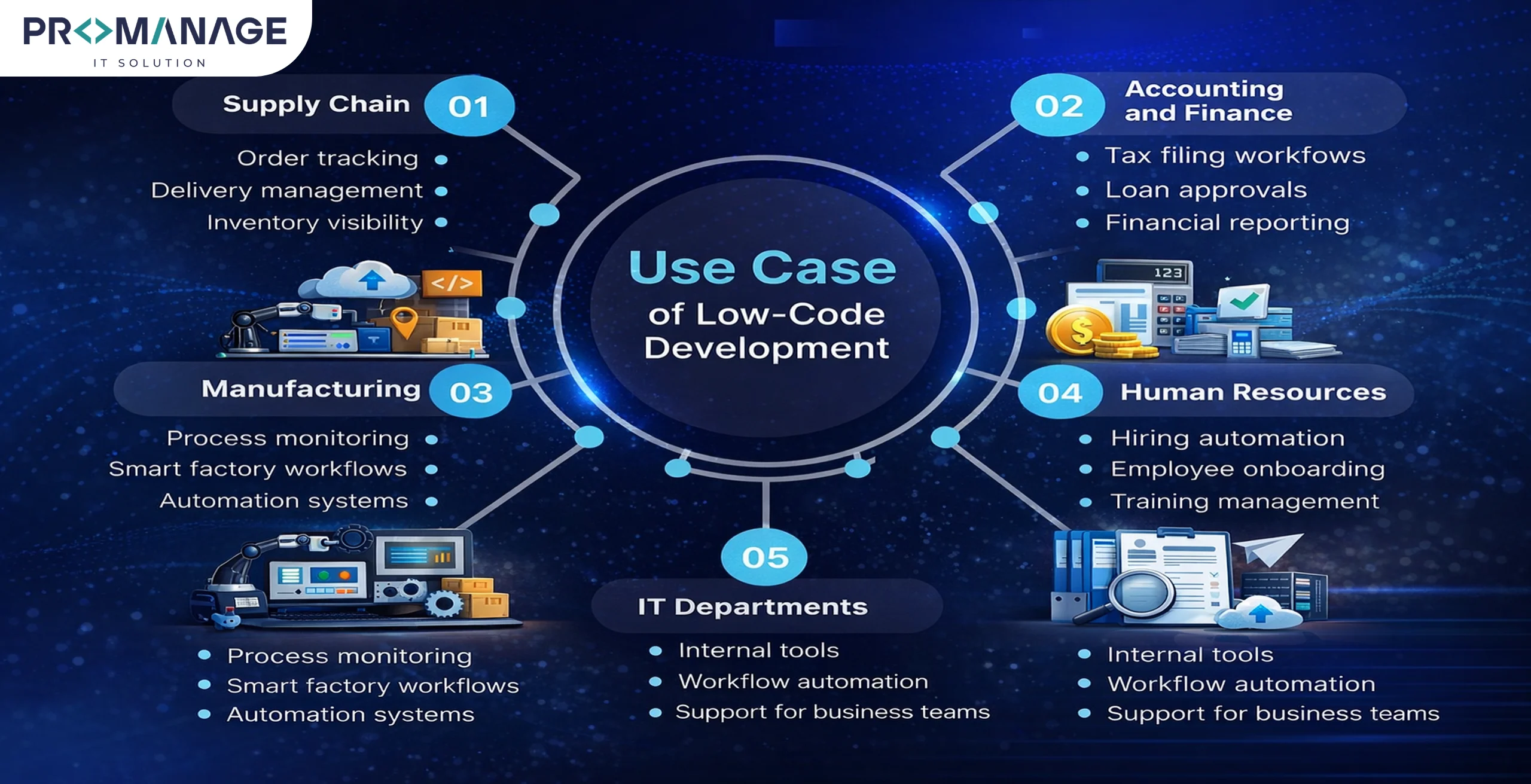
Low-Code, No-Code, and Automation
Low-code automation and no-code automation help businesses automate repetitive tasks. These platforms work well with Robotic Process Automation (RPA) and AI tools.
Low-code and no-code tools allow subject experts to design better workflows before automation. This gives rise to more accurate and efficient processes.
Benefits of Low-Code and No-Code Platforms
| Benefit | What It Means | Business Impact |
| Faster development
| Apps are created using visual tools | Quicker delivery of solutions
|
| Lower costs | Less coding and fewer resources needed | Reduced development expenses |
| Easy automation | Workflows are automated with simple rules | Less manual work
|
| Better collaboration | Business users and IT teams work together | Faster approvals and execution |
| Quick adaptability
| Apps can be changed easily | Better response to market changes |
| Improved customer experience | Faster and smoother applications | Higher customer satisfaction |
| More control | Internal teams manage their own apps | Better governance and visibility |
Challenges and How to Handle Them
Low-code and no-code platforms provide many benefits. But you know what? Everything has cons. Problems can arise if these platforms are used without planning.
One common issue is the rise of shadow IT projects. This takes place when applications are made without the knowledge or approval of the IT team. Another challenge is scalability. Some applications may work well at first but struggle as the business expands. Security risks can also appear if proper controls are not in place.
These challenges can be handled with the right approach. Organizations should set clear governance rules so that all applications follow security and compliance rules. Proper training should be provided to users so they build applications correctly. IT teams should remain involved by reviewing and monitoring LCNC projects.
These risks can be greatly reduced when low-code and no-code platforms are used with clear rules and teamwork.
Conclusion
Low-code and no-code application development has cleared the way for simple and faster software creation. It makes more people take part in building digital solutions and helps businesses adapt quickly.
Low-code and no-code platforms are going to play an important role in modern software development as demand for digital tools grows.

Related Posts











SEO Team Lead
Preeti is a skilled SEO Team Lead passionate about boosting organic traffic and improving search rankings. She leads with data-driven strategies to help businesses grow online effectively.